
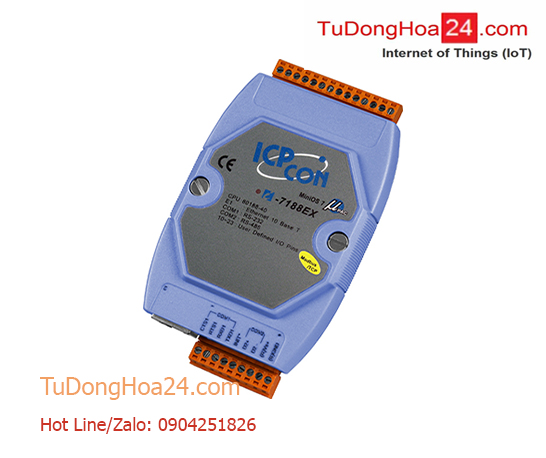
Bộ chuyển đổi Modbus Gateway 1 cổng RS-232/RS-485 sang Ethernet ICP DAS I-7188EX-MTCP
Features
Features of default Modbus firmware
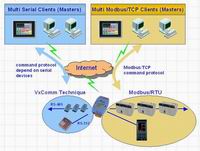
When you buy an I-7188E -MTCP controller, it already has the default Modbus firmware installed in Flash memory.
The default firmware has the follows features:
|
 |
Modbus SDK (in C language)
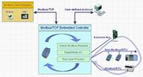
If the default firmware doesn’t totally suit your requirement. You can use Modbus SDK to modify the default firmware to add extra functions. The Modbus SDK has below features:
|
 |
Modbus Utility
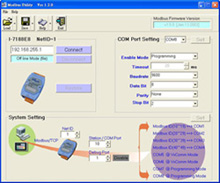
We provide Modbus tools for Windows 98/SE/NT/2K/XP, it includes:
|
 |
Applications
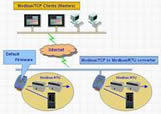
| Basic application 1: protocol converter An I-7188E -MTCP runs a default firmware to become a single Modbus/TCP to multi-Modbus/RTU converter. You can simply use the Modbus Utility to configure the device and then set connection between SCADA , HMI software and the I-7188E. |
 |
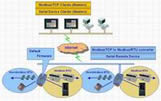
| Basic application 2: protocol converter with VxComm technique An I-7188E -MTCP is also be able to link to serial devices that don’t support Modbus/RTU. To use this function, you will need to install VxComm driver on host PCs. After installation, you will be able to access the remote COM ports via the standard serial driver. |
 |
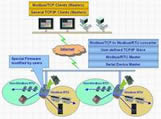
| Advanced application 1: Modbus/TCP controller Using the Modbus SDK, users can develop their own custom Modbus firmware, allowing extra functions, integration of serial devices and a Xboard to the Modbus/TCP kernel. Thus an I-7188E can become a powerful controller. |
 |
| Advanced application 2: Modbus/TCP controller with VxComm technique When an I-7188E -MTCP links same hardware devices as Advanced application 1 link to, if any devices connected to certain COM ports are not integrated into your custom firmware, you are still able to access the COM ports via the standard serial driver. In order to do this, you must install the VxComm driver on the host PCs. |
Specifications
| CPU | |
| CPU | 80188, 40MHz or compatible |
| SRAM | 512K bytes |
| Flash Memory | 512K bytes |
| EEPROM | 2K Bytes |
| NVRAM | 31 Bytes (battery backup, data valid up to 10 year) |
| RTC (Real Time Clock) | Yes |
| 64-bit Hardware Serial Number | Yes |
| Built-in Watchdog Timer | Yes |
| Communication Interface | |
| COM1 | RS-232 (TXD, RXD, RTS, CTS, GND) |
| COM2 | RS-485 (D2+, D2-) |
| Ethernet Port | 10BASE-T NE2000 compatible Ethernet Controller |
| COM Port Formats | |
| Data Bit | 7, 8 |
| Parity | Even, Odd, None |
| Stop Bit | 1 |
| LED Indicators | |
| 5-Digit 7 Segment LED Display | Yes (for I-7188EXD-MTCP only) |
| System LED Indicator | Yes |
| Hardware Expansion | |
| I/O expansion bus | Yes |
| User defined I/O pins | 14 pins |
| Dimensions | |
| I-7188EX(D)-MTCP | 123 mm x 72 mm x 33 mm |
| Operating Environment | |
| Operating Environment | -25°C to +75°C |
| Storage Temperature | -40°C to +80°C |
| Power | |
| Protection | Power reverse polarity protection |
| Required Supply Voltage | +10 to +30VDC (non-regulated) |
| Power consumption | 2W for I-7188EX-MTCP 3W for I-7188EXD-MTCP |
Ordering Informations
| I-7188EX-MTCP | I-7188EX with default Modbus/TCP firmware |
| I-7188EXD-MTCP | I-7188EXD with default Modbus/TCP firmware |
| I-7188EXD-MTCP-G | I-7188EXD with default Modbus/TCP firmware (Gray Cover) |
| I-7188EX-MTCP CR | I-7188EX with default Modbus/TCP firmware (RoHS) |
| I-7188EXD-MTCP CR | I-7188EXD with default Modbus/TCP firmware (RoHS) |
| I-7188EXD-MTCP-G CR | I-7188EXD with default Modbus/TCP firmware (Gray Cover) (RoHS) |
Note1:
The Modbus firmware can only run under 512K SRAM hardware. If you need more COM ports, you can buy an X board to expand the COM port number. Usage:
Step1. Open the cover of the I-7188EX or I-7188EXD.
Step2. Plug the X board to the I-7188EX or I-7188EXD.
Step3. Close the cover.