

Bộ chuyển đổi Modbus Gateway 1 cổng RS-232/485 sang Ethernet ICP DAS μPAC-7186PEXD-MTCP
Introduction
The uPAC-7186PEX(D)-MTCP series features true IEEE 802.3af-compliant (classification, Class 1) Power over Ethernet (PoE) using a standard category 5 Ethernet cable to receive power from a PoE switch like the NS-205PSE. The uPAC-7186PEX(D)-MTCP also works as a Modbus/TCP to Modbus/RTU or Modbus/ASCII gateway that supports most SCADA/HMI communications based on the Modbus communication protocol.
ICP DAS provides easy-to-use software development tool kits (Xserver, VxComm, Modbus libraries). Users can use them to easily integrate serial devices to have Ethernet/Internet communication ability and through the standard Modbus protocol to communicate with SCADA software (Indusoft, ISaGARF, DasyLab, Trace Mode, Citect, iFix, etc.).
For the hardware, it also supports an I/O expansion bus. The I/O expansion bus can be used to implement various I/O functions such as D/I, D/O, A/D, D/A, Timer/Counter, UART, flash memory, battery backup SRAM, AsicKey and other I/O functions. Nearly all kinds of I/O functions can be implemented by this bus but the bus can support only one Xboard. There are more than 30 boards available for uPAC-7186PEX(D)-MTCP, user can use one suitable Xboard to expand hardware features.
Features
|
 |
|||
|
 |
|||
|
 |
|||
Applications
| Basic application 1: protocol converter
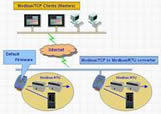
An μPAC-7186PEX-MTCP runs a default firmware to become a single Modbus/TCP to multi-Modbus/RTU converter. You can simply use the Modbus Utility to configure the device and then set connection between SCADA, HMI software and the μPAC-7186PEX. |
 |
| Basic application 2: protocol converter with VxComm technique
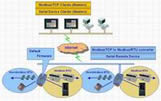
An μPAC-7186PEX-MTCP is also be able to link to serial devices that don’t support Modbus/RTU. To use this function, you will need to install VxComm driver on host PCs. After installation, you will be able to access the remote COM ports via the standard serial driver. |
 |
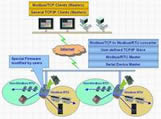
| Advanced application 1: Modbus/TCP controller
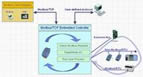
Using the Modbus SDK, users can develop their own custom Modbus firmware, allowing extra functions, integration of serial devices. Thus an μPAC-7186PEX-MTCP can become a powerful controller. |
 |
| Advanced application 2: Modbus/TCP controller with VxComm technique
When an μPAC-7186PEX-MTCP links same hardware devices as Advanced application 1 link to, if any devices connected to certain COM ports are not integrated into your custom firmware, you are still able to access the COM ports via the standard serial driver. In order to do this, you must install the VxComm driver on the host PCs. |
Specifications
| CPU | ||
| CPU | 80186, 80MHz or compatible | |
| SRAM | 512K bytes | |
| Flash Memory | 512K bytes | |
| EEPROM | 16K Bytes | |
| NVRAM | 31 Bytes (battery backup, data valid up to 10 year) | |
| RTC (Real Time Clock) | Yes | |
| 64-bit Hardware Serial Number | Yes | |
| Built-in Watchdog Timer | Yes | |
| Communication Interface | ||
| COM1 | RS-232 (TXD, RXD, RTS, CTS, GND) | |
| COM2 | RS-485 (D2+, D2-) | |
| Ethernet Port | 10/100Base-TX Ethernet Controller (Auto-negotiating, Auto_MDIX, LED indicator) |
|
| COM Port Formats | ||
| Data bit | 7, 8 | |
| Parity | Even, Odd, None | |
| Stop bit | 1 | |
| LED Display | ||
| 5-Digit 7 Segment LED Display | Yes (for μPAC-7186PEXD-MTCP only) | |
| System LED Indicator | Yes | |
| Hardware Expansion | ||
| I/O expansion bus | Yes | |
| User defined I/O pins | 14 pins | |
| Dimensions | ||
| W x H x D | 72 mm x 123 mm x 35 mm | |
| Operating Environment | ||
| Operating Temperature | -25°C ~ +75°C | |
| Storage Temperature | -40°C ~ +80°C | |
| Power | ||
| Protection | Power reverse polarity protection | |
| Input Range | PoE | IEEE 802 3af, Class 1 |
| Terminal block | +12 ~ 48 VDC (non-regulated) | |
| Power consumption | 1.5 W for μPAC-7186PEX-MTCP 2.5 W for μPAC-7186PEXD-MTCP |
|
Ordering Informations
| μPAC-7186PEX-MTCP CR | μPAC-7186PEX with default Modbus/TCP firmware (RoHS) |
| μPAC-7186PEXD-MTCP CR | μPAC-7186PEXD with default Modbus/TCP firmware (RoHS) |
Note1:
The Modbus firmware can only run under 512K SRAM hardware. If you need more COM ports, you can buy an X board to expand the COM port number. Usage:
Step1. Open the cover of the μPAC-7186PEX/μPAC-7186PEXD.
Step2. Plug the X board to the μPAC-7186PEX/μPAC-7186PEXD.
Step3. Close the cover.